



Enrollment and Registration
Enrollment vs. Registration
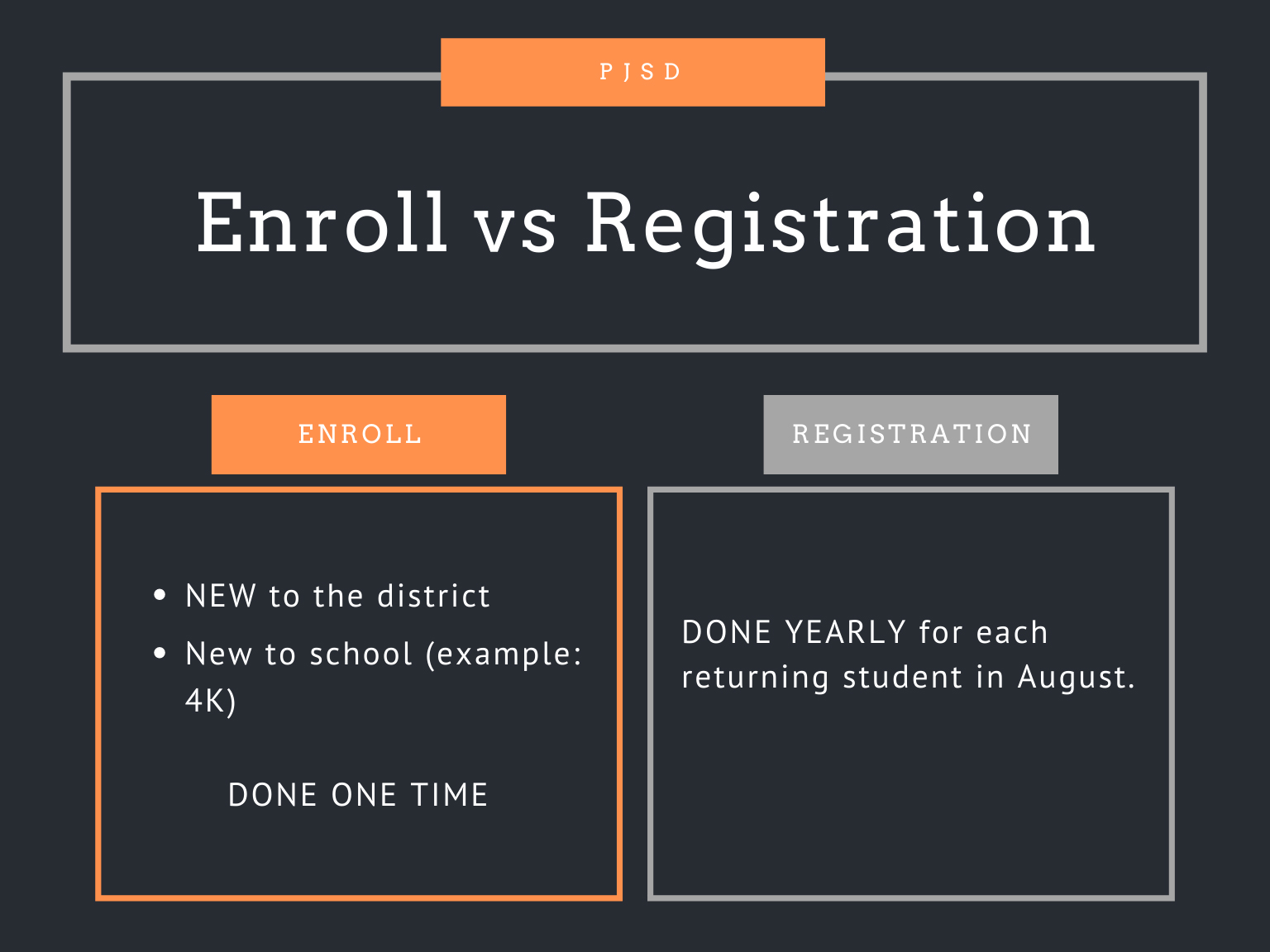
All new students must first enroll in the Plymouth School District. They then can register for the current or (in August) coming school year.
Enrollment
Welcome to the Plymouth WI School District! We are honored that you have trusted us with your child's education, and we look forward to helping your child become his or her best.
How to enroll
• Families with an EXISTING Plymouth Skyward account
If you already have a Skyward Family Access account with the Plymouth School District (from an older child), log in to Skyward Family Access and select "New Student Online Enrollment" from the left-hand menu. (see image)
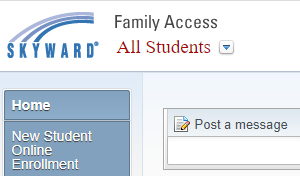 Skyward menu
• Families NEW to the Plymouth WI School District
- Begin by requesting enrollment access.
- You should receive an email with your login information and a temporary password. (If you do not have an email address, check that box and a temporary password will pop up.)
- Go to the Skyward Family Access login screen and change the Login Area to "Enrollment Access." (see image)
- Set your enrollment password, and select "New Student Online Enrollment" from the left-hand menu.
- Work through the enrollment steps.
Once enrollment is approved (and, at Plymouth High School only, you have met with a counselor), you will receive a confirmation email and then can register for the current school year (in August, if the school year has not yet started).
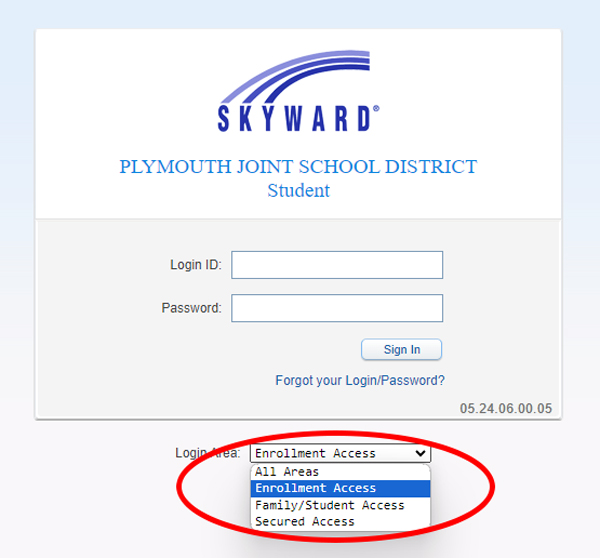 Skyward Family Access login screen
• Families WITHOUT INTERNET access
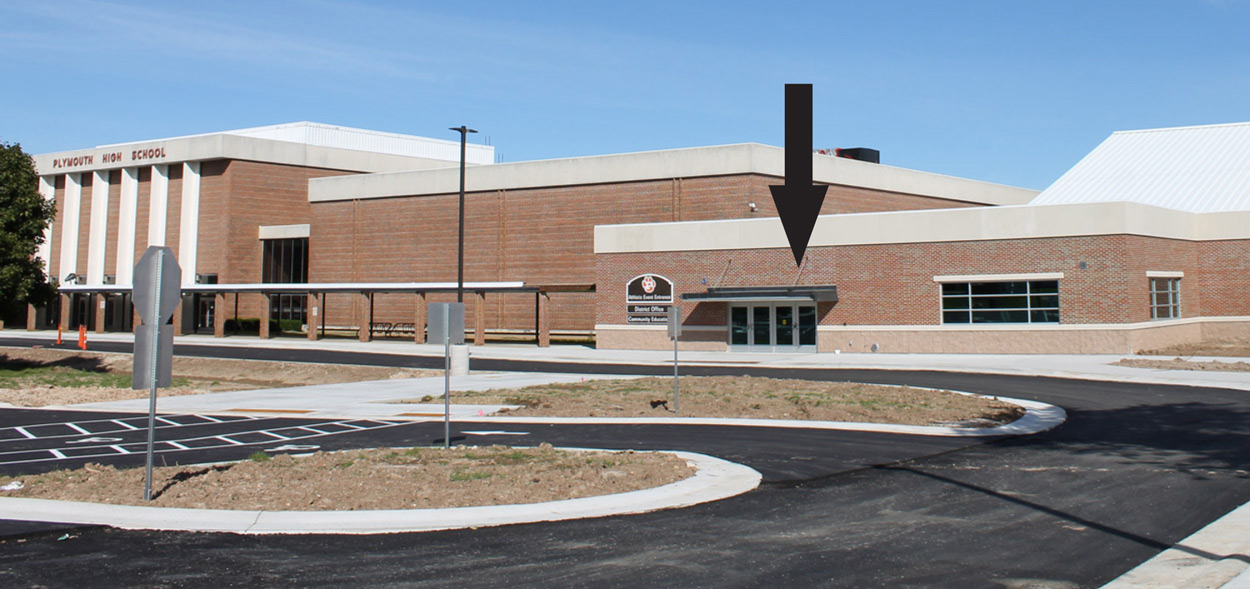
Families also can enroll in the Plymouth School District office, located on the south end of Plymouth High School, 125 S. Highland Ave. The office is open from 7:30am to 4pm school days. Park in the visitor lot in front of the school and enter Door 18.
Please bring the following with you:
• Child's birth certificate (if possible)
• Parent/guardian driver's license or other state ID
• A utility bill with your current address as proof of residency (if your ID does not have your current address)
PLEASE NOTE: Once you enroll one time in the district, you then need to register each year (see below).
Questions?
Please contact the District Office at pjsdenrollment@plymouth.k12.wi.us or (920) 892-2661 Ext. 1007.
4K Enrollment
Children who will be 4 years old on or before Sept. 1 are eligible for 4K, which features play-based learning in a classroom setting.
Information on 2027-28 4K enrollment will be available in January.
New 4K options for 2026-27
We are excited to announce two new 4K options for the 2026-27 school year, both of which received favorable feedback during the Enrollment Solutions meetings we held in the fall.
- Half-day 4K: Traditional program, which Meets in the mornings, when the academic work takes place. Families are responsible for pickup, as there will be no mid-day busing.
- Full-day 4K - NEW: Classes five days a week from 8:45 a.m. to 3:45 p.m., the same as other elementary students.
- Nature-based Montessori program - NEW: Offered as a 4K Community Approach program in partnership with Plymouth Forest Montessori. Meets 8:45 a.m. to 3:45 p.m. at Camp Anokijig; parents are responsible for transportation to and from school. (Note: Full for 2026-27 school year)
Contact the District Office at pjsdenrollment@plymouth.k12.wi.us or 920-892-2661 Ext. 1007 with any questions.

Open Enrollment
Families exploring their options through open enrollment are encouraged to consider the Plymouth School District, which is just the right size to offer personal attention along with a wealth of opportunities!
Wisconsin's inter-district public school open enrollment program allows parents/guardians of children in 4K through 12th grade to apply for their children to attend school districts other than the one in which they reside.
There is no tuition cost to families who opt for open enrollment (though they may be charged the same fees as resident students). However, families are responsible for transportation to and from school.
• Board of Education policy on Open Enrollment
Learn more:
• Visit our Why Plymouth? section to further explore what the Plymouth School District offers.
• Contact the district office at (920) 892-2661 with questions.
• Visit the state’s open enrollment web site at http://dpi.wi.gov/open-enrollment.
Registration (4K-12)
Students who have been enrolled then need to register for each subsequent school year in August.
2026-27 Registration
How to register
Follow these instructions to register each child. Those without access to the internet can contact any school office for assistance.
- Open Skyward Family Access.
- Log in with your Login ID and Password. (Please contact any school office if you need assistance.)
- Click on your child’s name in the drop-down box.
- Click on the school in the drop-down box.
- Click on the 2026-27 Registration box and follow the steps.
Registration tips
- On a mobile device, you can view some registration pages in full screen. Look for the button at the top of the page.
- If a document opens in a new tab, you will need to close that tab once finished to continue with registration.
- If you have questions about registration, contact your school office.
Assistance in Spanish
Families can contact our Spanish line at 920-892-5102 or stop in the PHS Office during regular hours.
Fees
Fees were due Aug. 28; school offices will be reaching out to families with outstanding fee balances.
Ways to pay:
- Online via RevTrak, the same vendor that handles Food Service payments; there is a service fee. (Note: Revtrak payments must be recorded manually, so there may be a delay before your Skyward account is updated.)
- In person, in your child's school office.
- By mailing a check to the appropriate school:
- Fairview Elementary School, 300 Salem Drive, Plymouth WI 53073
- Horizon Elementary School, 411 S. Highland Ave., Plymouth WI 53073
- Parkview Elementary School, 500 Parkview Drive, Plymouth WI 53073
- Riverview Middle School, 300 Riverside Circle, Plymouth WI 53073
- Plymouth High School, 125 S. Highland Ave., Plymouth WI 53073
Elementary fees
- Registration: $40 (required)
Riverview fees
- Registration: $60 (required)
- Instrument rental: $60 (optional)
PHS fees
- Registration: $60 (required)
- Co-curriculars fee: $85 (required)
- Parking permit: $80/year or $40/semester (optional)
- Instrument rental: $60 (optional)
- Laptop insurance: $25 (optional)
- Physical education T-shirt: $8 (required for freshmen)
More information:
- Need help paying your registration fees? Please complete a Free and Reduced Meal Application and a Fee Waiver Form.
- Plymouth High School 2026-27 Registration Fees
Food Service
Prices- Breakfast: free for students
- Elementary lunch: $3.30
- Riverview lunch: $3.50
- PHS lunch: $4.00
- Milk only: $0.65
Free & reduced meals
Free and Reduced Meal Application - Drop off in the District Office (PHS Door 18) or mail to Amy Williams, Plymouth School District, 125 S. Highland Ave., Plymouth WI 53073
• Instructions
• Frequently Asked Questions
• Fee Waiver Form - for help paying registration fees
Solicitud del hogar para comidas escolares gratuitas y de precio reducido - Déjelo en la Oficina del Distrito (PHS Puerta 18) o envíelo por correo a Amy Williams, Plymouth School District, 125 S. Highland Ave., Plymouth WI 53073
• Instrucciones
• Preguntas Frecuentes
• Planilla de exoneracion de tarifas
Visit the Food Service webpage for more information about school meals.
Additional information
Please note:
- Families who have moved within the district since last year need to provide the District Office with an updated Proof of Residency (parent driver's license, utility bill, etc.) Families that move out of the district after school starts on Sept. 1, 2026 must apply for Open Enrollment.
Forms for families
Where appropriate, please download, fill out, and return these forms to your school office.
- 2026-27 Bus Registration Form / 2026-27 Inscripción para el Transporte Escolar - Autobus (Notes: It will take up to 2 weeks to be placed on a route. Transportation is available for families living more than 2 miles from their assigned school.)
- Health Information / Información de Salud (only complete if not enrolling or registering online)
- Medication Authorization Form / Planilla de Autorización de Medicamentos
- Elementary School Reassignment Request Form / Escuela Primaria Solicitud De Recolocación
- Alternative Transportation Permission Form
School Supply Lists
- Fairview Supply List / Fairview Lista de Utiles Escolares
- Horizon Supply List / Horizon Lista de Utiles Escolares
- Parkview Supply List / Parkview Lista de Utiles Escolares
- Riverview Supply List / Riverview Lista de Utiles Escolares
- Plymouth High School does not have a supply list. Students will need a notebook, folder, pen, and pencil for each class. Teachers will let students know if additional supplies are needed for a particular class. (Need free school supplies, hygiene supplies, or clothing? Check out the Panther 'Fits Student Sharing & Career Closet!)
School policies
- Fairview Handbook
- Horizon Handbook
- Parkview Handbook
- Riverview Handbook
- PHS Handbook (Orange Guide) – tentative, pending Board of Education approval
- Annual notices
School calendars
- 2026-27 District 1-page summary / Calendario del distrito escolar
- PHS period rotation calendar
- PHS athletic events calendar
- PHS online calendar
- Riverview athletic events calendar
- Riverview online calendar
- Elementary online calendar
District information
- District website: The most-reliable, most in-depth source of info about the district
- Weekly e-newsletter: The easiest way to get info – right to your email inbox each Monday!
- Online Friday Folders: A paperless version of the traditional information folders
- Facebook: Features about schools, students, & staff; also upcoming events
- Instagram: Awesome photographs of our students, staff, & schools
Learn more:
- View our Childcare webpage for information about before- and after-school care options.
- Visit our Cancellations webpage, which has instructions on signing up for Skylert text alerts.
- Sign up for Johnson School Bus alerts:
- Elementary: Visit rmd.at/kdg66he to download the Remind app, or text kdg66he to 81010
- Riverview/PHS: Visit rmd.at/3d248ea to download the Remind app, or text 3d248ea to 81010
- If you have additional questions, please contact your school office:
- PHS 920-893-6911
- Riverview 920-892-4353
- Fairview 920-892-2621
- Horizon 920-892-2225
- Parkview 920-892-4076